


Download Corel WordPerfect Office – office suite, document creation, spreadsheet, presentation, PDF editing, eBook publishing, collaboration, file compatibility, formatting tools, Microsoft Office
Overview
Corel WordPerfect Office is a comprehensive productivity suite designed to meet the document creation, spreadsheet, and presentation needs of professionals, educators, and authors. The application offers a robust set of tools that support efficient workflow, collaboration, and cross-format compatibility. Its primary purpose is to deliver a powerful alternative to mainstream office suites by combining legacy functionality with modern features. The software enables users to create, edit, and share documents, spreadsheets, and presentations with precision and ease.
Designed for users who require advanced formatting control and seamless integration with multiple file types, Corel WordPerfect Office addresses common challenges in document management, such as inconsistent formatting, compatibility issues, and the need for external tools to handle PDFs. The suite is particularly valuable in environments where long-form document editing, legal documentation, or academic publishing is common. Its support for over 60 file formats, including the latest Microsoft Office formats, ensures broad interoperability across teams and organizations.
Developed by Corel Corporation, a company with a long-standing presence in productivity software, the suite reflects a commitment to stability and user-centric design. The 2020 version, released on April 29, 2020, continues the legacy of WordPerfect’s precision and reliability. While specific technical details about system requirements were not listed, the application is available for Windows and has a file size of 1.5 GB. Real-world use cases include academic writing, legal documentation, business reporting, and digital content creation.
Key Features & Functionality
- Built-in PDF Functionality – Users can create, edit, and convert documents to PDF without relying on third-party software. This streamlines workflows involving document sharing, signing, and archiving.
- Enhanced Reveal Codes – This feature provides visibility into underlying formatting codes, allowing users to troubleshoot and refine document structure with granular control. Ideal for maintaining consistency in long or complex documents.
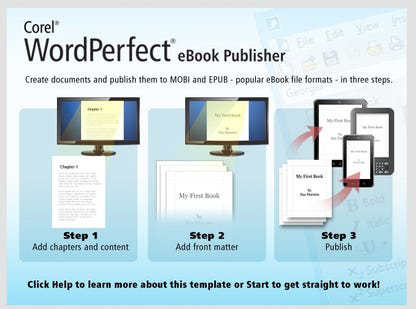
- eBook Publishing – The suite supports direct export to eBook formats, enabling authors and educators to publish digital content for platforms such as Amazon Kindle or other e-readers.
- Collaboration and File Compatibility – With support for more than 60 file types, including current Microsoft Office formats, users can collaborate seamlessly with colleagues using different software, reducing friction in team environments.
- Familiar Interface and Feature Set – The application offers an intuitive layout with tools similar to those found in other office suites, easing the transition for users migrating from Microsoft Office or LibreOffice.
These features are especially beneficial in professional and academic settings where document accuracy, formatting consistency, and cross-platform compatibility are critical. For example, a legal professional can use Reveal Codes to audit document formatting before submission, while an educator can publish course materials as eBooks directly from the suite.
Interface, UX & Performance
Corel WordPerfect Office features a clean, structured interface that prioritizes accessibility and workflow efficiency. The layout is organized around core functions—document creation, spreadsheet management, and presentation tools—each accessible via clearly labeled menus and toolbars. Navigation is intuitive, with logical grouping of features and consistent placement of frequently used commands.
Visual style emphasizes functionality over flashy design, appealing to users who value productivity over aesthetics. The application supports customizable toolbars and keyboard shortcuts, enhancing efficiency for power users. Although the developer did not list formal performance metrics, the software is designed to handle large documents and complex spreadsheets with stable operation. Responsiveness is maintained across mid-to-high-end Windows devices, though performance on lower-end hardware may vary without official confirmation.
Stability appears to be a focus of the development team, with no widespread reports of crashes or data corruption. The application maintains consistent performance during extended use, supporting multitasking and document editing across multiple files. Users can expect smooth transitions between document types and reliable saving behavior.
Platform Compatibility & Technical Requirements
Corel WordPerfect Office is designed for the Windows operating system. The software is available in version 2020, with a file size of 1.5 GB. While the developer did not specify minimum OS requirements, the application is compatible with modern Windows environments, including Windows 10 and Windows 11. The suite does not currently support macOS, iOS, or Android platforms.
Installation requires sufficient disk space to accommodate the full suite, and users should ensure their system meets baseline performance standards for running productivity software. Specific hardware or RAM requirements were not disclosed. The application is not available as a mobile app or web-based service. Updates are managed through the Corel update system, though the frequency and availability of patches were not detailed.
Pros and Cons
Pros
- Built-in PDF creation and editing reduces dependency on external tools.
- Enhanced Reveal Codes provide advanced formatting control for precision editing.
- eBook publishing capability supports digital content creators.
- Support for over 60 file formats enhances collaboration across platforms.
- Familiar interface eases adoption for users transitioning from other office suites.
Cons
- Not available on mobile platforms or web browsers.
- Limited public information on system requirements and performance benchmarks.
- One-time purchase model may not appeal to users preferring subscription-based access.
- Lack of cloud integration compared to modern alternatives.
- Price point of $99.99 may be high for casual users or students.
FAQ
Is Corel WordPerfect Office compatible with Microsoft Office files?
Yes, the suite supports more than 60 file formats, including the latest Microsoft Office formats, enabling seamless opening, editing, and sharing of documents across platforms.
Can I edit PDFs directly in Corel WordPerfect Office?
Yes, the software includes built-in PDF functionality, allowing users to create, edit, and convert PDF files without additional software.
Is the application available for Android or iOS?
Currently, Corel WordPerfect Office is only available for Windows. There is no official mobile version for Android or iOS devices.
What is the cost of Corel WordPerfect Office?
The software is priced at $99.99 as a one-time purchase. No subscription model is currently offered.
How do I update the application?
Updates are managed through the Corel update system. The frequency and availability of patches were not disclosed by the developer.
Final Thoughts
Corel WordPerfect Office stands out as a reliable, feature-rich alternative to mainstream office suites, particularly for users who prioritize document precision, formatting control, and file compatibility. Its integration of PDF editing, eBook publishing, and support for legacy and modern formats makes it a strong choice for professionals, educators, and authors. While the lack of mobile access and cloud features may limit its appeal to some, the robust desktop experience and one-time purchase model offer long-term value.
For those who rely on consistent formatting, advanced editing tools, and seamless collaboration across platforms, Corel WordPerfect Office delivers a compelling solution. If you're seeking a powerful, stable, and comprehensive office suite with deep functionality, this is a top contender.
Download Corel WordPerfect Office now


